
Helm 설치 추가
CloudNet@에서 진행하고 있는 K8s Advanced Network Study(이하, KANS)에 참여하게 되면서 기록을 남기고 있습니다.
이번에는 kind(Kubernetes IN Docker)를 Golang을 통해 설치하면서 약간의 소?란이 있었던 부분만 다룹니다.
1. KIND란?
- 아래 사진으로 대체합니다. 자세한 내용은 Docs/Initial_design에서 볼수 있습니다.
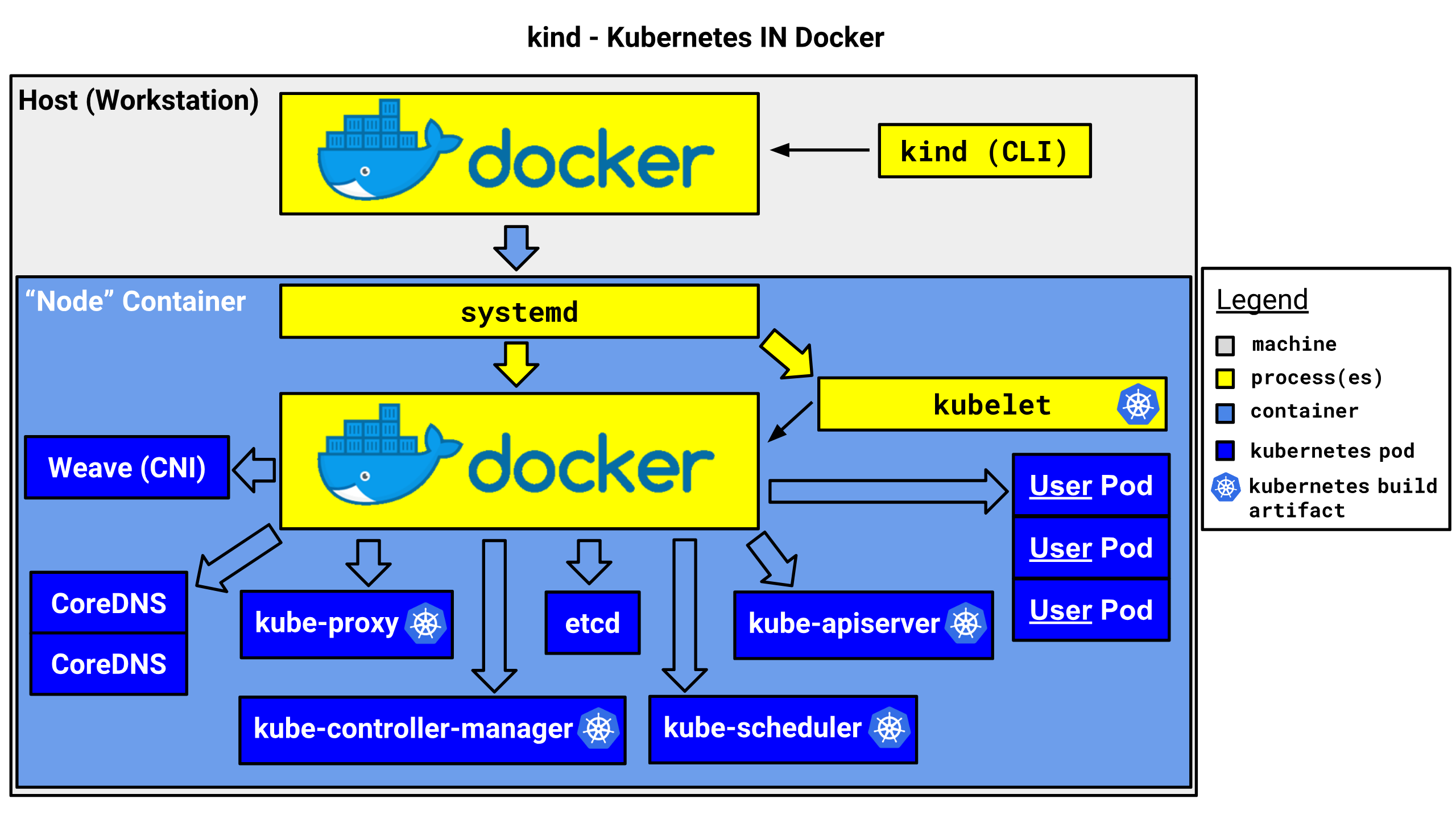
2. KIND 설치하기
- Docs/Quick-start를 참고합니다.
Linux의 경우, 패키지 관리자 설치가 없어 바이너리, 혹은 소스로 설치해야 합니다.
아래 두 문장에 뭔가 발동하여 Go 언어로 설치를 해보기로 했습니다.
If you are a go developer you may find the go install option convenient.

Otherwise we supply downloadable release binaries, community-managed packages, and a source installation guide.
3. 설치는 매우 간단
- Go 개발자는 아니지만, 잘 깔려있었고 그 GOPATH 환경변수도 확인됩니다. 무슨일이람.
❯ go version
go version go1.22.2 linux/amd64
❯ go env GOPATH
/home/kkumtree/go
- Docs를 잘 읽고, 아래와 같이 설치하면 됩니다.
go install sigs.k8s.io/[email protected]
4. 이걸로 끝 일리가 없다. 환경변수 설정
- 그런 건 존재하지 않습니다. Go를 개발에 사용해본 적이 없으면 아래처럼 Go 바이너리가 PATH 환경변수에 설정합니다.
❯ env | grep go
PATH=/home/kkumtree/go/bin:/home/kkumtree/.tfenv/bin:/home/kkumtree/.tfenv/bin:/home/kkumtree/.tfenv/bin:/home/kkumtree/.sdkman/candidates/java/current/bin:/home/kkumtree/.nvm/versions/node/v18.15.0/bin:/usr/local/sbin:/usr/local/bin:/usr/sbin:/usr/bin:/sbin:/bin:/usr/games:/usr/local/games:/snap/bin:/snap/bin
(a안) ~/.bashrc에 정적 지정
- 보통 이렇게하면, 사용하는데 별 문제가 없습니다.
echo 'export PATH=$PATH:/home/kkumtree/go/bin' >> ~/.bashrc
# zsh일 경우) exec bash
source ~/.bashrc
# zsh일 경우, 다시 zsh로 복귀) exec zsh
(b안) ~/.profile에 동적 지정
- 별다른 이유는 없고, profile에 조건 설정이 되어있어서 추가해보았습니다.
- 마지막 3줄만 추가로 작성
# ❯ cat ~/.profile
# ~/.profile: executed by the command interpreter for login shells.
# This file is not read by bash(1), if ~/.bash_profile or ~/.bash_login
# exists.
# see /usr/share/doc/bash/examples/startup-files for examples.
# the files are located in the bash-doc package.

# the default umask is set in /etc/profile; for setting the umask
# for ssh logins, install and configure the libpam-umask package.
#umask 022

# if running bash
if [ -n "$BASH_VERSION" ]; then
    # include .bashrc if it exists
    if [ -f "$HOME/.bashrc" ]; then
	. "$HOME/.bashrc"
    fi
fi

# set PATH so it includes user's private bin if it exists
if [ -d "$HOME/bin" ] ; then
    PATH="$HOME/bin:$PATH"
fi

# set PATH so it includes user's private bin if it exists
if [ -d "$HOME/.local/bin" ] ; then
    PATH="$HOME/.local/bin:$PATH"
fi

# set PATH so it includes user's gopath if it exists
if [ -x "/usr/bin/go" ] && [ -d "$(/usr/bin/go env GOPATH)/bin" ] ; then
    PATH="$(/usr/bin/go env GOPATH)/bin:$PATH"
fi
source ~/.profile로 적용한 후, kind version으로 설치 확인.
❯ source ~/.profile
❯ kind version
kind v0.24.0 go1.22.2 linux/amd64
5. 그 이외의 툴 설치
- kubectl: kubernetes Docs.
아래 방법말고도,sudo snap kubectl --classic한 줄만으로도 설치 가능합니다.
## Debian-based distributions

sudo apt-get update
# apt-transport-https may be a dummy package; if so, you can skip that package
sudo apt-get install -y apt-transport-https ca-certificates curl gnupg

# If the folder `/etc/apt/keyrings` does not exist, it should be created before the curl command, read the note below.
# sudo mkdir -p -m 755 /etc/apt/keyrings
curl -fsSL https://pkgs.k8s.io/core:/stable:/v1.31/deb/Release.key | sudo gpg --dearmor -o /etc/apt/keyrings/kubernetes-apt-keyring.gpg
sudo chmod 644 /etc/apt/keyrings/kubernetes-apt-keyring.gpg # allow unprivileged APT programs to read this keyring

# This overwrites any existing configuration in /etc/apt/sources.list.d/kubernetes.list
echo 'deb [signed-by=/etc/apt/keyrings/kubernetes-apt-keyring.gpg] https://pkgs.k8s.io/core:/stable:/v1.31/deb/ /' | sudo tee /etc/apt/sources.list.d/kubernetes.list
sudo chmod 644 /etc/apt/sources.list.d/kubernetes.list   # helps tools such as command-not-found to work correctly

sudo apt-get update
sudo apt-get install -y kubectl
- k9s: Snapcraft/k9s.
전에 다른 분이 알록달록 잘 쓰셔서 한 번 설치해보았습니다.
sudo snap install k9s
- helm: Helm Docs #From Apt (Debian/Ubuntu).
k8s를 편하게 쓰고자하는 일종의 레포지토리입니다.
curl https://baltocdn.com/helm/signing.asc | gpg --dearmor | sudo tee /usr/share/keyrings/helm.gpg > /dev/null
# sudo apt-get install apt-transport-https --yes # Use If error occurs
echo "deb [arch=$(dpkg --print-architecture) signed-by=/usr/share/keyrings/helm.gpg] https://baltocdn.com/helm/stable/debian/ all main" | sudo tee /etc/apt/sources.list.d/helm-stable-debian.list
sudo apt-get update
sudo apt-get install helm

kkumtree
Source code on GitHub
© 2025 kkumtree and contributors All rights reserved.
Licensed under
CC BY-NC-ND 4.0


