kkumtree

Blog maintanence in 2024

  • kkumtree

2024-08-26T00:02:49+09:00

Before starting group study, I decided to update my blog.

Very small things, but I have some needs about it.

One is GitHub Actions’ dependency update and another is Licences.

Cause, Blog is deployed via Github Actions, I need to check dependencies in Github Actions’ workflow.

What I use is actions/checkout, actions/setup-go, and actions/setup-node.

Name Prev. Version Latest Version Purpose
checkout actions/checkoutv3 actions/checkoutv4 Src. and Dest. Branch
setup-go actions/setup-go@v4 actions/setup-go@v5 Hugo
setup-node actions/setup-node@v3 actions/setup-node@v4 Vanila Framework

github_actions

그림으둜 λ°°μš°λŠ” ꡬ글 ν΄λΌμš°λ“œ 101 리뷰

  • kkumtree

2023-11-21T13:51:29+09:00

Jpubμ—μ„œ 졜근 μΆœνŒν•œ 그림으둜 λ°°μš°λŠ” ꡬ글 ν΄λΌμš°λ“œ 101 - 제이펍 ν™ˆνŽ˜μ΄μ§€μ— λŒ€ν•΄,
μ§§λ§‰ν•˜κ²Œ μ†Œκ°œν•˜λŠ” κΈ€μž…λ‹ˆλ‹€.

γ€Šκ·Έλ¦ΌμœΌλ‘œ λ°°μš°λŠ” ꡬ글 ν΄λΌμš°λ“œ 101》 μ„œν‰λ‹¨μœΌλ‘œ λ³Έ λ„μ„œλ₯Ό μ œκ³΅λ°›μ•„ μž‘μ„±ν•˜μ˜€μŠ΅λ‹ˆλ‹€.

졜근 AWS ν”„λ‘œμ νŠΈλ₯Ό μ§„ν–‰ν•˜κ³  μžˆμŠ΅λ‹ˆλ‹€. Terraform을 ν™œμš©ν•˜μ—¬, IaC 기반의 인프라 ꡬ성을 ν•˜κ³  μžˆλŠ”λ°μš”.

μž‘λ…„λΆ€ν„° DR(DR, Disaster Recovery)이 κΈ‰κ²©ν•˜κ²Œ 화두가 λ˜λ©΄μ„œ,
Multi-AZ, Multi-Region을 λ„˜μ–΄ Multi-Cloud도 고렀의 λŒ€μƒμ΄ λ˜λŠ” 것 κ°™μŠ΅λ‹ˆλ‹€.

관심이 μžˆλŠ”μ§€λΌ 이번 ν”„λ‘œμ νŠΈκ°€ λλ‚˜λ©΄, AWS 외에도 GCP같은 λ‹€μ–‘ν•œ CSPλ₯Ό λ‹€μ‹œκΈˆ 닀뀄보고 μ‹Άλ‹€λŠ” 생각이 λ“€μ—ˆμŠ΅λ‹ˆλ‹€.

λ¬Όλ‘  GCPλ₯Ό μ£Όλ ₯으둜 μ“°κ³  μžˆλ‹€λ©΄ 이야기가 λ‹€λ₯΄κ² μ§€λ§Œ,
맨 처음 ν΄λΌμš°λ“œλ₯Ό λ°°μš°λŠ” μž…μž₯, ν˜Ήμ€ GCP에 λŒ€ν•œ ꡬ좕 κ²½ν—˜μ΄ 적은 μƒν™©μ—μ„œ μš”κ΅¬μ‚¬ν•­μ— 따라 μΆ”κ°€μ μœΌλ‘œ GCPλ₯Ό κ΅¬μΆ•ν•΄μ•Όν•˜λŠ” 상황이라면
κ΅­λ‚΄μ—μ„œλŠ” 기쑴에 GCPλ₯Ό λΉ λ₯΄κ²Œ μ ‘κ·Όν•˜κ³  배울 수 μžˆλŠ” 방법이 AWS λŒ€λΉ„ λ§Žμ§€ μ•Šλ‹€κ³  λŠκΌˆμŠ΅λ‹ˆλ‹€.

TFC(Terraform Cloud) drift μ•Œλ¦Ό μ„€μ •

  • kkumtree

2023-10-15T00:10:33+09:00

CloudNet@μ—μ„œμ˜ Terraform μŠ€ν„°λ””κ°€ λλ‚˜κ³  λ‚˜μ„œ,
ν…ŒλΌνΌμ„ μ‹€μ œ 운영 상황에 λ„μž…ν•˜λ©΄μ„œ λ§ˆμ£Όν•  수 밖에 μ—†λŠ” λ“œλ¦¬ν”„νŠΈ(drift) 상황에 λŒ€ν•΄
μ΄ν•΄ν•΄λ³΄λŠ” μ‹œκ°„μ„ κ°€μ‘ŒμŠ΅λ‹ˆλ‹€.

μ°Έκ³ ) TFCμ—μ„œμ˜ Drift Detection κΈ°λŠ₯은 ν˜„μž¬ TFC Plus μ—λ””μ…˜μ—μ„œ μ§€μ›λ©λ‹ˆλ‹€.  

1. μš©μ–΄ 이해해보기

사싀은 μž‘λ…„λΆ€ν„° ν…ŒλΌνΌμ„ μ ‘ν•˜κ³ λ‚˜μ„œ, IaCλΌλŠ” κ°œλ…μ— κ½‚νžˆκΈ°λ§Œ ν–ˆμ§€
운영 μž…μž₯μ—μ„œ λ§ˆμ£Όν–ˆμ—ˆλ˜ μˆ˜λ§Žμ€ μ‹œν–‰μ°©μ˜€λ“€μ„ ν”ν•œ μœ μ €μ—λŸ¬λ‘œλ§Œ μƒκ°ν•΄μ™”μ—ˆμŠ΅λ‹ˆλ‹€.
μŠ€ν„°λ””μ— μ°Έμ—¬ν•˜λ©΄μ„œ μ’…μ’… ‘λ“œλ¦¬ν”„νŠΈ’λΌλŠ” 단어λ₯Ό λ“£κ³ , μ°Ύμ•„λ³΄λ‹ˆ
상당뢀뢄이 이에 μ†ν•˜λŠ” μƒν™©μ΄λΌλŠ” 것을 μ•Œ 수 μžˆμ—ˆμŠ΅λ‹ˆλ‹€.

(1) Drift?

κΈ€ μž‘μ„±μ„ μœ„ν•΄ μ°Ύμ•„λ³Έ 기술적 DriftλŠ” 본래 주행에 μžˆμ–΄μ„œμ˜ 그것과
크게 차이가 μ—†μŒμ„ μ•Œ 수 μžˆμ—ˆμŠ΅λ‹ˆλ‹€.

Understanding terraform module

  • kkumtree

2023-10-04T11:24:13+09:00

This week is last week of CloudNet@ group study about terraform.

In this study, my personal goal is making AWS architecture only with terraform and one tfstate file.

  • Basic knowledge about AWS resources is required.

1. Terraform without Module

Before, I already met terraform for maintaining AWS in production level.
But at that time, our team maintain them as folder structure which is used by terraformer

# example structure

$ tree
.
β”œβ”€β”€ alb
β”‚   β”œβ”€β”€ lb.tf
β”‚   β”œβ”€β”€ lb_listener.tf
β”‚   β”œβ”€β”€ lb_target_group.tf
β”‚   β”œβ”€β”€ lb_target_group_attachment.tf
β”‚   β”œβ”€β”€ outputs.tf
β”‚   β”œβ”€β”€ provider.tf
β”‚   └── variables.tf
β”œβ”€β”€ auto_scaling
β”‚   β”œβ”€β”€ autoscaling_group.tf
β”‚   β”œβ”€β”€ launch_template.tf
β”‚   β”œβ”€β”€ outputs.tf
β”‚   β”œβ”€β”€ provider.tf
β”‚   └── variables.tf
β”œβ”€β”€ ec2_instance
β”‚   β”œβ”€β”€ instance.tf
β”‚   β”œβ”€β”€ outputs.tf
β”‚   β”œβ”€β”€ provider.tf
β”‚   └── variables.tf
β”œβ”€β”€ eni
β”‚   β”œβ”€β”€ network_interface.tf
β”‚   β”œβ”€β”€ outputs.tf
β”‚   └── provider.tf
β”œβ”€β”€ igw
β”‚   β”œβ”€β”€ internet_gateway.tf
β”‚   β”œβ”€β”€ outputs.tf
β”‚   β”œβ”€β”€ provider.tf
β”‚   └── variables.tf
β”œβ”€β”€ nacl
β”‚   β”œβ”€β”€ default_network_acl.tf
β”‚   β”œβ”€β”€ outputs.tf
β”‚   β”œβ”€β”€ provider.tf
β”‚   └── variables.tf
β”œβ”€β”€ route_table
β”‚   β”œβ”€β”€ main_route_table_association.tf
β”‚   β”œβ”€β”€ outputs.tf
β”‚   β”œβ”€β”€ provider.tf
β”‚   β”œβ”€β”€ route_table.tf
β”‚   β”œβ”€β”€ route_table_association.tf
β”‚   └── variables.tf
β”œβ”€β”€ s3
β”‚   β”œβ”€β”€ outputs.tf
β”‚   β”œβ”€β”€ provider.tf
β”‚   └── s3_bucket.tf
β”œβ”€β”€ sg
β”‚   β”œβ”€β”€ outputs.tf
β”‚   β”œβ”€β”€ provider.tf
β”‚   β”œβ”€β”€ security_group.tf
β”‚   └── variables.tf
β”œβ”€β”€ subnet
β”‚   β”œβ”€β”€ outputs.tf
β”‚   β”œβ”€β”€ provider.tf
β”‚   β”œβ”€β”€ subnet.tf
β”‚   └── variables.tf
└── vpc
    β”œβ”€β”€ outputs.tf
    β”œβ”€β”€ provider.tf
    └── vpc.tf

At glance, this solution looks like cool.
But, problems were enough critical to think ‘why we have to use terraform?’.

Troubleshoot when using terraformer with tfenv

  • kkumtree

2023-09-24T11:47:51+09:00

Removing & installing packages are some annoying, isn’t it? So, I like using version managers like SDKMAN, nvm, etc..

I also use tfenv for terraform version management.
(prev post: KR/‘Terraform μ‹œμž‘ν•˜κΈ° w/Minimal Ubuntu’)

And I recommend neighbors to use terraformer for first learning about terraform.

terraformer is a great terraform generator tool for converting existing cloud infrastructure to terraform code.

In this post, I write how I use terraformer with tfenv.

1. How to install terraformer in Linux

  • After follow below, you can use terraformer with terraformer command!
export PROVIDER=aws 
# you can use other providers like 'google, kubernetes',
# Or if you want to use all providers, adjust 'all' instead of 'aws'
curl -LO "https://github.com/GoogleCloudPlatform/terraformer/releases/download/$(curl -s https://api.github.com/repos/GoogleCloudPlatform/terraformer/releases/latest | grep tag_name | cut -d '"' -f 4)/terraformer-${PROVIDER}-linux-amd64"
chmod +x terraformer-${PROVIDER}-linux-amd64
sudo mv terraformer-${PROVIDER}-linux-amd64 /usr/local/bin/terraformer

2. Importing AWS VPC with terraformer

  • After install terraformer, you can import AWS VPC with terraformer like below
    (Also you can import other AWS resources like EC2, S3, etc..)
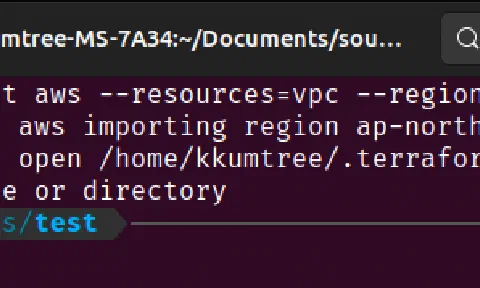
terraformer import aws --resources=vpc --regions=ap-northeast-2 
  • But, error will happen… if you use tfenv like me.
$ terraformer import aws --resources=vpc --regions=ap-northeast-2
2023/09/24 12:03:53 aws importing region ap-northeast-2
2023/09/24 12:03:53 open /home/kkumtree/.terraform.d/plugins/linux_amd64: no such file or directory
$ whereis terraform
terraform: /home/kkumtree/.tfenv/bin/terraform
  • As you can see, terraformer can’t find terraform binary.

IAM STSλ₯Ό μ΄μš©ν•œ Terraform Cloud κΆŒν•œ λΆ€μ—¬

  • kkumtree

2023-09-13T20:54:28+09:00

μ΄λ²ˆμ—λŠ” Terraform Cloudκ°€ μ–Όλ§ˆλ‚˜ 쒋은지 더 μ•Œμ•„λ³΄κΈ° μœ„ν•΄,
μŠ€ν„°λ””μ—μ„œ μ§€μ†μ μœΌλ‘œ μž₯점이 κ°•μ‘°λ˜μ–΄ μ™”λ˜ Terraform Cloud에
IAM STSλ₯Ό μ΄μš©ν•œ κΆŒν•œ λΆ€μ—¬ 도전 및 적용 성곡에 λŒ€ν•΄ 써보렀고 ν•©λ‹ˆλ‹€.

Terraform의 μƒνƒœ μ €μž₯을 μœ„ν•΄ 보톡 AWS S3λ₯Ό μ‚¬μš©ν•˜λŠ”λ°,
μ•Œλ‹€μ‹œν”Ό S3 기둝은 λ¬΄λ£Œμ§€λ§Œ, λΆˆλŸ¬μ˜€λŠ” 것은 μœ λ£Œμž…λ‹ˆλ‹€.
(μ „κΈ°λŠ” κ΅­μ‚°μ΄μ§€λ§Œ, μ›λ£ŒλŠ” μˆ˜μž…μž…λ‹ˆλ‹€)

κ·Έλž˜μ„œ μŠ€ν„°λ””μš©μœΌλ‘œλŠ” Terraform을 뢈러올 λ•Œλ§ˆλ‹€,
μƒνƒœ 값을 S3말고, λ‘œμ»¬μ— μ €μž₯ν–ˆμ—ˆλŠ”λ°μš”.
λ°–μ—μ„œλŠ” λ…ΈνŠΈλΆ, μ§‘μ—μ„œλŠ” λ°μŠ€ν¬νƒ‘μœΌλ‘œ ν•˜λ €λ‹ˆ
이걸 GitHub의 Private Repo에 μ €μž₯ν• κΉŒ? ν•˜λ‹€κ°€
Terraform Cloudλ₯Ό 써보기둜 ν–ˆμŠ΅λ‹ˆλ‹€. (κ³ ν†΅μ˜ μ‹œμž‘)

Terraform resource μ΄ν•΄ν•˜κΈ° w/AWS VPC

  • kkumtree

2023-09-08T22:41:14+09:00

μ΄λ²ˆμ—λŠ” CloudNet@λ₯Ό 톡해 ν•™μŠ΅ν•œ λ‚΄μš©μ„ 기반으둜,

  • AZλ₯Ό λŒ€μƒμœΌλ‘œ ν•œ data 쑰회
  • AWS VPC 생성 예제둜 μ‚΄νŽ΄λ³΄λŠ” output
  • resource 이름 λ³€κ²½

순으둜 μ•Œμ•„λ³΄λ„λ‘ ν•˜κ² μŠ΅λ‹ˆλ‹€.

ꡐ재둜 μ‚¬μš©ν•œ [ν…ŒλΌνΌμœΌλ‘œ μ‹œμž‘ν•˜λŠ” IaC] 도 μ°Έκ³ ν•˜μ˜€μŠ΅λ‹ˆλ‹€.

κΈ°λ³Έ μ„€μ •

  • aws-cli에 리전을 ap-northeast-2을 μ„€μ •ν•˜μ˜€μŠ΅λ‹ˆλ‹€.
$ aws configure list

      Name                    Value             Type    Location
      ----                    -----             ----    --------
   profile                <not set>             None    None
access_key     ****************2U5J shared-credentials-file    
secret_key     ****************Z0co shared-credentials-file    
    region           ap-northeast-2      config-file    ~/.aws/config

1. data 쑰회

dataλŠ” μ‚¬μš©μžκ°€ μ •μ˜ν•˜λŠ” resource 및 λ¦¬μ†ŒμŠ€μ— λŒ€ν•œ μŠ€νŽ™κ³Ό λ°˜λŒ€λ‘œ,
provider(이번 ν¬μŠ€νŠΈμ—μ„œλŠ” aws)μ—μ„œ μ œκ³΅ν•˜λŠ” λ¦¬μ†ŒμŠ€λ₯Ό μ‘°νšŒν•˜λŠ” κΈ°λŠ₯μž…λ‹ˆλ‹€.

Terraform μ‹œμž‘ν•˜κΈ° w/Minimal Ubuntu

  • kkumtree

2023-08-31T22:21:08+09:00

μ΄λ²ˆμ—λŠ” CloudNet@μ—μ„œ μ§„ν–‰ν•˜λŠ” Terraform μŠ€ν„°λ””(μ΄ν•˜, T101)에 μ°Έμ—¬ν–ˆμŠ΅λ‹ˆλ‹€.

Terraform을 μ“°λ©΄ μ™œ μ’‹μ€μ§€λŠ” μžμ„Έν•˜κ³  전문적인 글이 μžˆμœΌλ―€λ‘œ, μ°Έκ³ ν•˜μ‹œλ©΄ 쒋을 것 κ°™μŠ΅λ‹ˆλ‹€. (링크: 44bits)

μ˜ˆμ „μ— ν…ŒλΌνΌμ„ 썼던 적이 μžˆμ§€λ§Œ, Moduleν™”κ°€ 어렡기도 ν•˜κ³ 
이번 κΈ°νšŒμ— ν…ŒλΌνΌ 신간을 λ‹€μ‹œ λ³΅κΈ°ν•˜λŠ” 마음으둜 μ°Έμ—¬ν–ˆμŠ΅λ‹ˆλ‹€.

μ‚¬μš©ν•œ κ΅μž¬λŠ” [ν…ŒλΌνΌμœΌλ‘œ μ‹œμž‘ν•˜λŠ” IaC] μž…λ‹ˆλ‹€.

μ΄λ²ˆμ—λŠ” Terraform 초기 셋업에 λŒ€ν•΄, μ‚΄νŽ΄λ³΄κ³ 
μ‹œν—˜μ‚Όμ•„ Canonical 곡식 Minimal Ubuntu(ARM64) AMIλ₯Ό μ„€μΉ˜ν•΄λ³΄κ² μŠ΅λ‹ˆλ‹€.

  • Terraform μ„€μΉ˜
  • tfenv μ‚¬μš©κ³Ό .tf μž‘μ„± λ”°λΌν•˜κΈ°
  • Hello World in terraform
  • Terraform 써보기

순으둜 μ§„ν–‰ν•©λ‹ˆλ‹€.

Terraform μ„€μΉ˜

Terraform은 Linux ν™˜κ²½(Ubuntu κΈ°μ€€)μ—μ„œ μ„€μΉ˜ν•  수 μžˆλŠ” 방법이 3κ°€μ§€ 정도 μžˆμŠ΅λ‹ˆλ‹€.
μ΅œμ‹ λ‚΄μš©μ€ Terraform CLIμ—μ„œ 확인할 수 μžˆμŠ΅λ‹ˆλ‹€.

Init Calico from quay registry

  • kkumtree

2023-07-25T00:40:14+09:00

Written in 25 July 2023.
It could be different when you read this article.

Error I met

I met error message like Init:ImagePullBackOff when I tried to create calico pod.

kubectl get pods --all-namespaces
NAMESPACE     NAME                                                     READY   STATUS                  RESTARTS   AGE   
kube-system   calico-kube-controllers-xxxxxxxxxx-yyyyy                 1/1     Running                 1          13h   
kube-system   calico-node-xxxxx                                        0/1     Init:ImagePullBackOff   0          13h

Why it happened

Yes, it’s because of changed docker hub policy. Recently, I’m in an environment that about 20~30 people use 4 public IP addresses. So, it’s easy to reach docker hub pull rate limit.

Windowsμ—μ„œ μ—¬λŸ¬ Github 토큰 관리

  • kkumtree

2023-07-04T09:57:14+09:00

ν‰μ†Œμ—λŠ” Git관리λ₯Ό terminal을 ν†΅ν•΄μ„œ ν•˜κ³ ,
μ—¬λŸ¬ SSHν‚€λ₯Ό 톡해 μž‘μ—…μ„ ν•˜κΈ°μ—
.ssh/configλ₯Ό 톡해 ν‚€ 기반으둜 κ΄€λ¦¬ν•˜κ³  μžˆμ—ˆλ‹€.

μ–΄μ©Œλ‹€λ³΄λ‹ˆ, 토큰 기반으둜 그것도 μœˆλ„μš°μ—μ„œ 관리λ₯Ό ν•΄λ³΄κ²Œ λ˜μ–΄μ„œ λ‘˜ λ‹€ μƒμ†Œν•œ 접근이라 μƒˆλ‘œμš΄ 셋업을 μ μš©ν•΄λ³΄κΈ°λ‘œ ν–ˆλ‹€.
VSCode 기반으둜 μ„ΈνŒ…ν•˜κΈ°μ—, κ·ΈλŒ€λ‘œ λ”°λΌμ˜¨λ‹€λ©΄ 별 문제 없이 잘 적용될 것이닀.

cf. classic token이라 할지라도, 큰 μ΄μŠˆλŠ” 없을 κ²ƒμœΌλ‘œ μƒκ°λœλ‹€.

Git config의 μ μš©λ²”μœ„

git config <parameter>λ₯Ό 톡해, μ„€μ • 값을 ꡬ성할 수 μžˆλ‹€. system > global > local 순으둜 μ˜΅μ…˜μ΄ overrideλœλ‹€.

  1. <<
  2. <
  3. 1
  4. 2
  5. 3
  6. 4
  7. 5
  8. 6
  9. >
  10. >>

kkumtree

Source code on GitHub

Β© 2025 kkumtree and contributors All rights reserved.
Licensed under
CC BY-NC-ND 4.0